Showing posts with label hacking. Show all posts
Showing posts with label hacking. Show all posts
07:43
Researcher Finds 17 Year-Old Windows Vulnerability…in MS-DOS

Guess what? A Google security researcher has uncovered a potential security vulnerability that dates all the way back to the original Windows NT released in 1993.

Security researchers—and, of course, cybercriminals, attachers, and maybe even governments—are always looking for new ways to break into Microsoft Windows, since it’s long-established itself and the lowest common denominator of operating systems. Sometimes, these research efforts uncover bugs that have been round for a long time, but Google security engineer Tavis Ormandy may have taken the cake: he found a security hole in Windows that’s so old it could be graduating from high school this year.
The bug impacts all versions of Windows from the brand-new Windows 7 all the way back to Windows NT 3.1, which originally shipped in 1993. The issue is in the Virtual DOS Machine used to support 16-bit applications originally implemented to support MS-DOS applications and 16-bit applications from Windows 3.1 days; according to Ormandy’s findings, the Virtual DOS machine can be exploited to enabled unprivileged 16-bit programs to manipulate kernel stacks so attackers could get their own code executed at system privilege levels. In theory, this could let attackers take over the computer and do anything they like. And, yes, the problem has been there for 17 years.
In a security advisory, Microsoft says it is not aware of any attacks that exploit the vulnerability, and Windows users are believed to be at low risk. However, users who are concerned can disable their system’s MSDOS and WOWEXEC subsystems (which correspond to CMDLINE and WOWCMDLINE services) to block the problem—at least, provided they don’t need to use any 16-bit applications.
Microsoft hasn’t made any statement on when it plans to release a patch; however, Microsoft is already planning on a record patch Tuesday for February 2010, with 13 security issues set to be shored up.
11:19
Free Topup Tricks 4 All Prepaid Mobile (2010)
Now all prepaid users can recharge there mobile online for free. Join dostee.pk for free and earn points for any activity.
Note that they will give you points for all the activities.For example they give 10 points daily just for log in.Earn points and spend those poins to recharge your mobile phone for free.
Register Here For Free OR Click Here To Visit dsotee.pk .
Note that they will give you points for all the activities.For example they give 10 points daily just for log in.Earn points and spend those poins to recharge your mobile phone for free.
Register Here For Free OR Click Here To Visit dsotee.pk .
10:22
Guide: Make your own wifi network with any wireless enabled computer/laptop
Do you have an internet connection or broadband supply, but no wireless router to give you wifi around the home. Well have no fear, because there’s no need to spend £50 on a wireless router if you’ve got a computer of laptop with wifi capabilities. It’ll mean that if you have broadband but not a wireless router, you’ll be able to create a wifi network and get things like an iPod Touch on the internet.
I’m going to show you how to create your own little wifi network using a Vista computer and any wireless hardware. As long as it’s capable of picking up wifi signals, it’ll be able to send them too.
Before you start, make sure your wireless hardware is on, but not connected to any wifi network.
The first thing you need to do is get your wired connection (or source connection) to share it’s internet supply with other connections. To do this, open the Network and Sharing Center, click Manage Network Connections on the left, and then find your source connection. In my case this is the ‘Nokia 3120 classic Bluetooth Modem (OTA)’ connection. You need to right click your source connection and select Properties, as shown below.

When you’ve got to the Properties dialog, you then need to click the Sharing tab, and then follow these instructions. Tick the ‘Allow other network users to connect through this computer’s Internet connection’ checkbox, and then from the drop down menu, select ‘Wireless Network Connection’. Then, make sure the ‘Allow other network users to control or disable the shared Internet connection’ is also ticked (if not, then tick it), but make sure that ‘Establish a dial-up connection whenever a computer on my network attempts to access the Internet’ is not ticked. If you don’t untick it, you’ll be nagged with dial-up connection requests consistently.
This is what the settings dialog should look like:

OK, so once that looks the same as mine, just click OK. It will probably take a few seconds to respond to you, but that’s normal.
Next what you need to do, is you need to create an ad-hoc wireless connection. To do this, do the following.
Open up the Network and Sharing Center again, and this time click ‘Manage wireless connections’. When the dialog comes up, click the Add button at the top. Then, when it asks ‘How do you want to add a network?’, click ‘Create an ad-hoc network. On the ‘Set up a wireless ad hoc network’ click Next, and then on the next page follow these instructions.
In the ‘Network name’ box, type a name for a network. It can be anything really, but I’d suggest something like WIFI or something simple along those lines. Next, you need to decide whether you want security on the network. I would suggest you do since you don’t want anybody you don’t know on your wifi. Just make sure you remember the code you set. If you live in a rural area where there’s not going to be anyone using your wifi, there probably isn’t much point in setting a wifi code – just do what you think is appropriate.
When you’ve finished choosing security settings, click Save this Network, and then Next.
Your wifi connection is now active. Now get your iPod Touch, or whatever you want to get on WiFi, and then find the wifi network and connect to it.
Hopefully, after you connect, it should work as normal and you should get internet. If you don’t, check your source connections settings again. Remember, you’ll need your computer to be connected to your source connection for this to work properly.
If you do have any problems, post a comment and I’ll investigate for you.
I’m going to show you how to create your own little wifi network using a Vista computer and any wireless hardware. As long as it’s capable of picking up wifi signals, it’ll be able to send them too.
Before you start, make sure your wireless hardware is on, but not connected to any wifi network.
The first thing you need to do is get your wired connection (or source connection) to share it’s internet supply with other connections. To do this, open the Network and Sharing Center, click Manage Network Connections on the left, and then find your source connection. In my case this is the ‘Nokia 3120 classic Bluetooth Modem (OTA)’ connection. You need to right click your source connection and select Properties, as shown below.
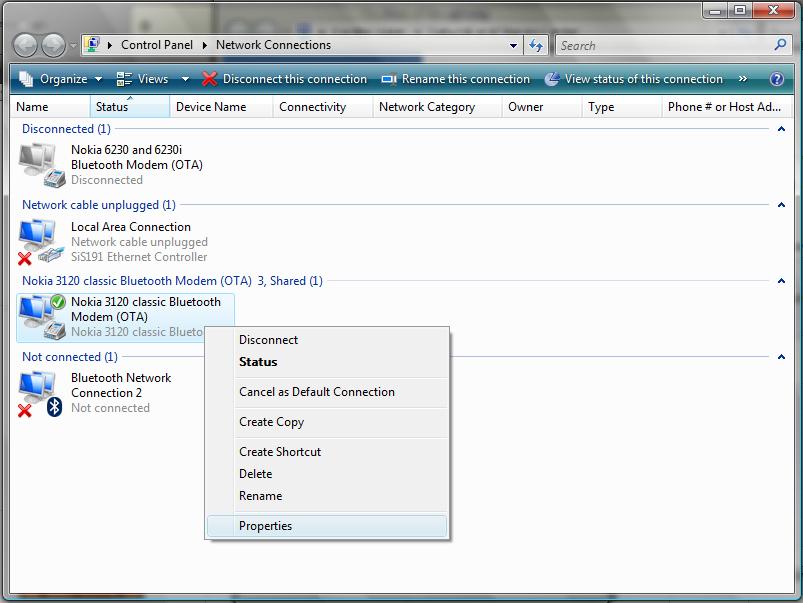
When you’ve got to the Properties dialog, you then need to click the Sharing tab, and then follow these instructions. Tick the ‘Allow other network users to connect through this computer’s Internet connection’ checkbox, and then from the drop down menu, select ‘Wireless Network Connection’. Then, make sure the ‘Allow other network users to control or disable the shared Internet connection’ is also ticked (if not, then tick it), but make sure that ‘Establish a dial-up connection whenever a computer on my network attempts to access the Internet’ is not ticked. If you don’t untick it, you’ll be nagged with dial-up connection requests consistently.
This is what the settings dialog should look like:
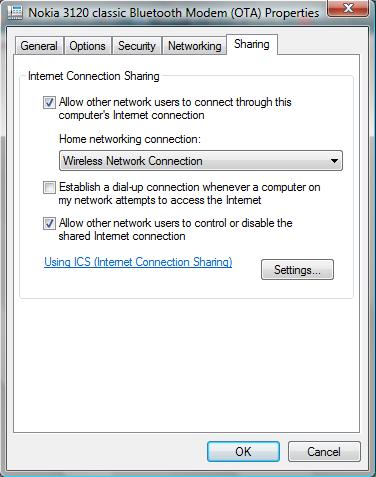
OK, so once that looks the same as mine, just click OK. It will probably take a few seconds to respond to you, but that’s normal.
Next what you need to do, is you need to create an ad-hoc wireless connection. To do this, do the following.
Open up the Network and Sharing Center again, and this time click ‘Manage wireless connections’. When the dialog comes up, click the Add button at the top. Then, when it asks ‘How do you want to add a network?’, click ‘Create an ad-hoc network. On the ‘Set up a wireless ad hoc network’ click Next, and then on the next page follow these instructions.
In the ‘Network name’ box, type a name for a network. It can be anything really, but I’d suggest something like WIFI or something simple along those lines. Next, you need to decide whether you want security on the network. I would suggest you do since you don’t want anybody you don’t know on your wifi. Just make sure you remember the code you set. If you live in a rural area where there’s not going to be anyone using your wifi, there probably isn’t much point in setting a wifi code – just do what you think is appropriate.
When you’ve finished choosing security settings, click Save this Network, and then Next.
Your wifi connection is now active. Now get your iPod Touch, or whatever you want to get on WiFi, and then find the wifi network and connect to it.
Hopefully, after you connect, it should work as normal and you should get internet. If you don’t, check your source connections settings again. Remember, you’ll need your computer to be connected to your source connection for this to work properly.
If you do have any problems, post a comment and I’ll investigate for you.
09:07
Session hijacking - Steal cookies on a remote computer
I have wrote many a articles on cookie stealing,today i thought to write on How to steal cookies on a remote computer by a method known as session hijacking,and introduce to cookie stealing
What is session hijacking?
session hijacking is taking over a user session and stealing cookies on a remote computer. essentially it is when two computers establish a connection and an attacker assumes the position of one of the computers through their session id.By using the authenticated state stored as a session variable, a session-based application can be open to hijacking. When a request is sent to a session-based application, the browser includes the session identifier, usually as a cookie, to access the authenticated session. Rather than snoop for usernames and passwords, a hacker can use a session ID to hijack an existing session and steal cookies on a remote computer
How it works
1. an admin logs into his control panel of his website.
2. a session id is generated.
3. his computer mysteriously goes offline without logging out (hehe)
4. you can then guess his session id
5. if the session id is right, you can assume his admin privileges
http sessions are stateless. i guess when they developed http they weren't thinking about individual sessions. session id's were created to track a single user for each page he viewed without re-authenticating every time. a session id properly identify's the user and allows them access.session hijacking does require cookie theft, if you dont want to guess the damn session id for years, this is where xss and other forms of exploits on web applications come in. if you fail to see the "phpsessid=3209U3R6IMH2' in your browser then
most likely their is a hidden Torrent on the page with the php session idd value. naturally this would be yours
if your logged in.
![]()
Suppose:
1. user A and user B are both logged in at rafayhackingarticles.blogspot.com
2. user has no admin permissions. User B does.
3. user A messages, or posts a link somewhere for user B to click.
4. when user B clicks the link the 'hot link' logs their referrer.
OR
Surfjack is the name given to an attack that allows a man in the middle to hijack session cookies even when the victim is making use of SSL instead of plaintext HTTP. This video shows the tool being demonstrated against a Gmail account. The proof of concept tool (also called surfjack) is able to work on both Ethernet by making use of ARP cache poisoning, and WiFi in monitor mode. Although Gmail somehow fixed the issue by setting the cookies to "secure", many other sites are still vulnerable.
How to prevent session hijacking:
The SSL only helps with sniffing attacks. If an attacker has access to your machine I will assume they can copy your secure cookie too.
At the very least, make sure old cookies lose their value after a while. Even a successful hijaking attack will be thwarted when the cookie stops working. If the user has a cookie from a session that logged in more than a month ago, make them reenter their password. Make sure that whenever a user clicks on your site's "log out" link, that the old session UUID can never be used again.
I'm not sure if this idea will work but here goes: Add a serial number into your session cookie, maybe a string like this:
SessionUUID, Serial Num, Current Date/Time
Encrypt this string and use it as your session cookie. Regularly change the serial num - maybe when the cookie is 5 minutes old and then reissue the cookie. You could even reissue it on every page view if you wanted to. On the server side, keep a record of the last serial num you've issued for that session. If someone ever sends a cookie with the wrong serial number it means that an attacker may be using a cookie they intercepted earlier so invalidate the session UUID and ask the user to reenter their password and then reissue a new cookie.
Remember that your user may have more than one computer so they may have more than one active session. Don't do something that forces them to log in again every time they switch between computers.
What is session hijacking?
session hijacking is taking over a user session and stealing cookies on a remote computer. essentially it is when two computers establish a connection and an attacker assumes the position of one of the computers through their session id.By using the authenticated state stored as a session variable, a session-based application can be open to hijacking. When a request is sent to a session-based application, the browser includes the session identifier, usually as a cookie, to access the authenticated session. Rather than snoop for usernames and passwords, a hacker can use a session ID to hijack an existing session and steal cookies on a remote computer
How it works
1. an admin logs into his control panel of his website.
2. a session id is generated.
3. his computer mysteriously goes offline without logging out (hehe)
4. you can then guess his session id
5. if the session id is right, you can assume his admin privileges
http sessions are stateless. i guess when they developed http they weren't thinking about individual sessions. session id's were created to track a single user for each page he viewed without re-authenticating every time. a session id properly identify's the user and allows them access.session hijacking does require cookie theft, if you dont want to guess the damn session id for years, this is where xss and other forms of exploits on web applications come in. if you fail to see the "phpsessid=3209U3R6IMH2' in your browser then
most likely their is a hidden Torrent on the page with the php session idd value. naturally this would be yours
if your logged in.
Stealing cookies on a remote computer - session hijacking
Suppose:
1. user A and user B are both logged in at rafayhackingarticles.blogspot.com
2. user has no admin permissions. User B does.
3. user A messages, or posts a link somewhere for user B to click.
4. when user B clicks the link the 'hot link' logs their referrer.
OR
Surfjack is the name given to an attack that allows a man in the middle to hijack session cookies even when the victim is making use of SSL instead of plaintext HTTP. This video shows the tool being demonstrated against a Gmail account. The proof of concept tool (also called surfjack) is able to work on both Ethernet by making use of ARP cache poisoning, and WiFi in monitor mode. Although Gmail somehow fixed the issue by setting the cookies to "secure", many other sites are still vulnerable.
How to prevent session hijacking:
The SSL only helps with sniffing attacks. If an attacker has access to your machine I will assume they can copy your secure cookie too.
At the very least, make sure old cookies lose their value after a while. Even a successful hijaking attack will be thwarted when the cookie stops working. If the user has a cookie from a session that logged in more than a month ago, make them reenter their password. Make sure that whenever a user clicks on your site's "log out" link, that the old session UUID can never be used again.
I'm not sure if this idea will work but here goes: Add a serial number into your session cookie, maybe a string like this:
SessionUUID, Serial Num, Current Date/Time
Encrypt this string and use it as your session cookie. Regularly change the serial num - maybe when the cookie is 5 minutes old and then reissue the cookie. You could even reissue it on every page view if you wanted to. On the server side, keep a record of the last serial num you've issued for that session. If someone ever sends a cookie with the wrong serial number it means that an attacker may be using a cookie they intercepted earlier so invalidate the session UUID and ask the user to reenter their password and then reissue a new cookie.
Remember that your user may have more than one computer so they may have more than one active session. Don't do something that forces them to log in again every time they switch between computers.