Showing posts with label hacke satellite. Show all posts
Showing posts with label hacke satellite. Show all posts
10:22
Guide: Make your own wifi network with any wireless enabled computer/laptop
Do you have an internet connection or broadband supply, but no wireless router to give you wifi around the home. Well have no fear, because there’s no need to spend £50 on a wireless router if you’ve got a computer of laptop with wifi capabilities. It’ll mean that if you have broadband but not a wireless router, you’ll be able to create a wifi network and get things like an iPod Touch on the internet.
I’m going to show you how to create your own little wifi network using a Vista computer and any wireless hardware. As long as it’s capable of picking up wifi signals, it’ll be able to send them too.
Before you start, make sure your wireless hardware is on, but not connected to any wifi network.
The first thing you need to do is get your wired connection (or source connection) to share it’s internet supply with other connections. To do this, open the Network and Sharing Center, click Manage Network Connections on the left, and then find your source connection. In my case this is the ‘Nokia 3120 classic Bluetooth Modem (OTA)’ connection. You need to right click your source connection and select Properties, as shown below.

When you’ve got to the Properties dialog, you then need to click the Sharing tab, and then follow these instructions. Tick the ‘Allow other network users to connect through this computer’s Internet connection’ checkbox, and then from the drop down menu, select ‘Wireless Network Connection’. Then, make sure the ‘Allow other network users to control or disable the shared Internet connection’ is also ticked (if not, then tick it), but make sure that ‘Establish a dial-up connection whenever a computer on my network attempts to access the Internet’ is not ticked. If you don’t untick it, you’ll be nagged with dial-up connection requests consistently.
This is what the settings dialog should look like:

OK, so once that looks the same as mine, just click OK. It will probably take a few seconds to respond to you, but that’s normal.
Next what you need to do, is you need to create an ad-hoc wireless connection. To do this, do the following.
Open up the Network and Sharing Center again, and this time click ‘Manage wireless connections’. When the dialog comes up, click the Add button at the top. Then, when it asks ‘How do you want to add a network?’, click ‘Create an ad-hoc network. On the ‘Set up a wireless ad hoc network’ click Next, and then on the next page follow these instructions.
In the ‘Network name’ box, type a name for a network. It can be anything really, but I’d suggest something like WIFI or something simple along those lines. Next, you need to decide whether you want security on the network. I would suggest you do since you don’t want anybody you don’t know on your wifi. Just make sure you remember the code you set. If you live in a rural area where there’s not going to be anyone using your wifi, there probably isn’t much point in setting a wifi code – just do what you think is appropriate.
When you’ve finished choosing security settings, click Save this Network, and then Next.
Your wifi connection is now active. Now get your iPod Touch, or whatever you want to get on WiFi, and then find the wifi network and connect to it.
Hopefully, after you connect, it should work as normal and you should get internet. If you don’t, check your source connections settings again. Remember, you’ll need your computer to be connected to your source connection for this to work properly.
If you do have any problems, post a comment and I’ll investigate for you.
I’m going to show you how to create your own little wifi network using a Vista computer and any wireless hardware. As long as it’s capable of picking up wifi signals, it’ll be able to send them too.
Before you start, make sure your wireless hardware is on, but not connected to any wifi network.
The first thing you need to do is get your wired connection (or source connection) to share it’s internet supply with other connections. To do this, open the Network and Sharing Center, click Manage Network Connections on the left, and then find your source connection. In my case this is the ‘Nokia 3120 classic Bluetooth Modem (OTA)’ connection. You need to right click your source connection and select Properties, as shown below.
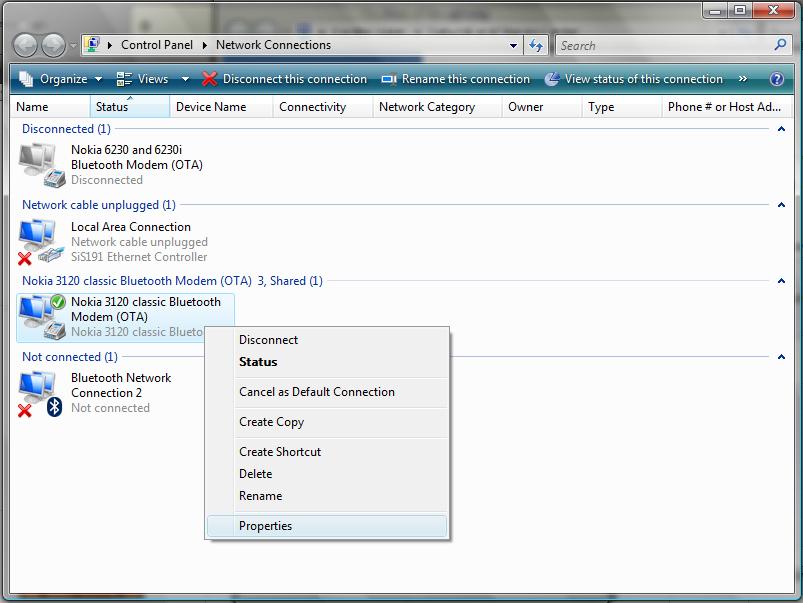
When you’ve got to the Properties dialog, you then need to click the Sharing tab, and then follow these instructions. Tick the ‘Allow other network users to connect through this computer’s Internet connection’ checkbox, and then from the drop down menu, select ‘Wireless Network Connection’. Then, make sure the ‘Allow other network users to control or disable the shared Internet connection’ is also ticked (if not, then tick it), but make sure that ‘Establish a dial-up connection whenever a computer on my network attempts to access the Internet’ is not ticked. If you don’t untick it, you’ll be nagged with dial-up connection requests consistently.
This is what the settings dialog should look like:
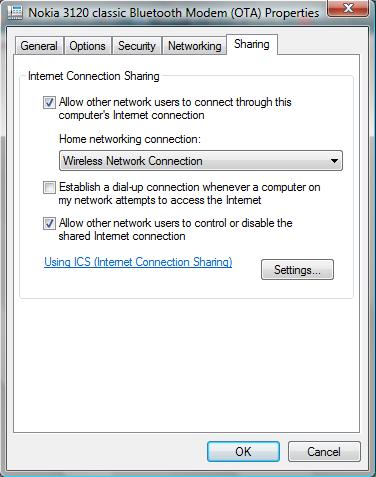
OK, so once that looks the same as mine, just click OK. It will probably take a few seconds to respond to you, but that’s normal.
Next what you need to do, is you need to create an ad-hoc wireless connection. To do this, do the following.
Open up the Network and Sharing Center again, and this time click ‘Manage wireless connections’. When the dialog comes up, click the Add button at the top. Then, when it asks ‘How do you want to add a network?’, click ‘Create an ad-hoc network. On the ‘Set up a wireless ad hoc network’ click Next, and then on the next page follow these instructions.
In the ‘Network name’ box, type a name for a network. It can be anything really, but I’d suggest something like WIFI or something simple along those lines. Next, you need to decide whether you want security on the network. I would suggest you do since you don’t want anybody you don’t know on your wifi. Just make sure you remember the code you set. If you live in a rural area where there’s not going to be anyone using your wifi, there probably isn’t much point in setting a wifi code – just do what you think is appropriate.
When you’ve finished choosing security settings, click Save this Network, and then Next.
Your wifi connection is now active. Now get your iPod Touch, or whatever you want to get on WiFi, and then find the wifi network and connect to it.
Hopefully, after you connect, it should work as normal and you should get internet. If you don’t, check your source connections settings again. Remember, you’ll need your computer to be connected to your source connection for this to work properly.
If you do have any problems, post a comment and I’ll investigate for you.
09:16
How To Hack Internet Satellites

“What’s interesting about this is that it’s very, very easy,” says Nve. “Anyone can do it: phishers or Chinese hackers … it’s like a very big Wi-Fi network that’s easy to access.”
Nve’s research proves that anyone using satellite Internet is not as safe as they think they are. A hacker that knows how to do this can set up fake websites designed to look and act like the real thing and steal your password information or install malicious software on your computer. So far, Nve has tested this out on geosynchronous satellites aimed at Europe, Africa and South America, but he says that there is little doubt that the same tricks would work on satellites facing North America or anywhere else.