Showing posts with label latest mobiles. Show all posts
Showing posts with label latest mobiles. Show all posts
08:58
Poster Compares the Samsung Galaxy S Phones
 The Samsung Galaxy S series of Android mobile phones have been a huge success in the U.S. as well as various international markets.
Compare Samsung Galaxy S Phones
The Galaxy S phones are available though all major carriers in the U.S. though with a slightly different set of features and under different names – you get them as Epic 4G on Sprint, Samsung Vibrant on T-Mobile, Samsung Fascinate on Verizon and Captivate on AT&T.If you are based in the U.S. and are planning to go for a Galaxy S, the following poster from BillShrink should help you narrow down your choices.
The poster compares the common features and technical specifications of the various Galaxy S phones as well as the contract plans.
Samsung Galaxy S – What’s Common

Samsung Galaxy S – What’s Different

08:53
Motorola Unveils a New Android Phone: The T-Mobile Charm


Motorola today announced some specs, images and availability details for a new Android phone.Dubbed the Motorola Charm, this oddly shaped device will ship to T-Mobile subscribers this summer with a 2.8-inch screen, the current Android 2.1 operating system (not Froyo), and a slew of social features.
If you’re thinking this looks and sounds a bit like the ill-fated Kin — small screen, square-ish shape, social emphasis, physical keyboard — we can’t really blame you for your déjà vu. But we won’t consign the Charm to the technological junk heap just yet; we still don’t know just why the Kin failed, so we aren’t convinced that similar features in another phone will lead it to the same demise.
In addition to its keyboard — a welcome feature for heavy texters and social media addicts — the Charm sports a touchscreen and a navigation pad. Called the “Backtrack” pad, this hardware feature is located on the back of the device and works like a laptop touch panel. Without having a review model, we can’t say whether this feature will be a blessing — saving space on a tiny touchscreen so you can actually see what you’re navigating around — or a curse — you can’t tell what you’re navigating around or accidentally use the pad while holding the phone. Another hardware perk is its two-microphone noise cancellation functionality for clearer calls in ambient noise-filled areas.
The phone’s social features will have customization and filtering options. Charm will also play nicely with Flash, and it’ll come pre-loaded with the usual suite of Google apps. Its 3MP camera might not compete with a more media-centric device like the Droid X, but this phone is aimed at a more social, less “artistic” crowd, we’re guessing.
And, like the Kin’s Studio feature, the Charm features browser-based access to all the device’s data, including media such as videos and photos. Data can be transfered via a USB port or WiFi connection.
We’re expecting to see the Charm hit shelves before the end of the summer.
As far as smartphones go, most of the big-name devices have launched on Verizon, AT&T and Sprint. The former network has the blockbuster Droid, and Sprint is seeing plenty of buzz around the Evo, which it’s billing as the first 4G device on a 4G network. And of course, the iPhone 4 is selling like hotcakes, much to the delight of AT&T, with whom Apple still has an exclusive contract.
If the Charm turns into the high-volume, tween-friendly phone the Kin wanted to be, T-Mobile might have a winner on their hands. What do you think — is the Charm a device that interests you?
07:37
Windows Mobile 6.5 Will Become Windows Phone Classic
On the heels of unveiling its Windows Phone 7 Series, Microsoft says Windows Mobile 6.5 will stick around under the name Windows Phone Classic.
 Microsoft stole a little spotlight in the mobile world this week, announcing Windows Phone 7 Series, due later this year, which represents a serious revamp for its struggling Windows Mobile operating system. Now, Microsoft is adding a little confusion—and perhaps a bit of a wet blanket—to its mobile story. Apparently Windows Mobile 6.5 won’t be going away; instead, it will co-exist alongside Microsoft’s flagship Windows Phone 7 Series, re-christened as Windows Phone Classic.
Windows Mobile 6.5 Interface
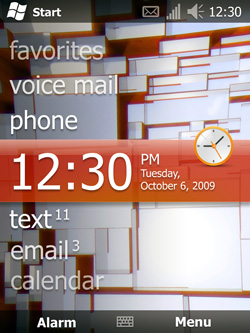 Microsoft stole a little spotlight in the mobile world this week, announcing Windows Phone 7 Series, due later this year, which represents a serious revamp for its struggling Windows Mobile operating system. Now, Microsoft is adding a little confusion—and perhaps a bit of a wet blanket—to its mobile story. Apparently Windows Mobile 6.5 won’t be going away; instead, it will co-exist alongside Microsoft’s flagship Windows Phone 7 Series, re-christened as Windows Phone Classic.
According to the blog istartedsomething, Microsoft intends to pitch Windows Phone 7 Series at consumers and everyday phone users, while keeping Windows Phone Classic around for enterprise and government customers, both to support legacy systems but also as an alternative for customers who may not want their users having all the whiz-bang time-wasting media and social networking features due in Windows Phone 7 Series. Windows Phone Classic will apparently also be targeted at emerging markets.
The news may also be welcome for some OEMs, since Microsoft is setting far stricter hardware requirements for Windows Phone 7 Series devices (including specific screen size, button arrangement, and processor capabilities): Windows Phone Classic devices could presumably run a wider range, and perhaps not sport a tasteful “Bing” button.
Microsoft hasn’t detailed long-term plans for Windows Phone Classic: there’s no indication whether this is an end-of-life rebranding for an OS the company plans to mothball, or whether Microsoft anticipates continuing development of new features and releases for its now “classic” mobile operating system.
07:30
Nokia E72 Review
I review the Nokia E72 which is a little like a Porsche 911 Turbo with the interior of a 1995 Chevy Lumina.

Like most of Nokia’s late-model smartphones, the E72 uses Symbian OS 9.3, with Nokia’s S60 3rd Edition Feature Pack 2 (also known as S60 3.2.3), as a user interface.
 The screen and keyboard occupy about the same space up front, with a jumble of Nokia-specific keys (including hard shortcuts to calendar, e-mail and contacts) filling in the middle. The center directional pad on the E72 departs from previous models by working in two ways: You can either press the raised edges, or drag a finger lightly across the black middle key, which works as an optical trackpad. Nokia calls it the “Navi Key.”
The right-hand side has separate volume up and down keys, along with a voice key for access to applications and contacts without typing (more on that later). The other side has a sealed-up microUSB port, and one of the most deeply recessed and therefore hard-to-use microSD slots we’ve ever found (unless you have long nails, you’ll need a key or pen to pop cards in and out). Up top, you’ll find a centered power button and standard 3.5mm stereo jack for headphones. The bottom offers another tiny charging port for accepting the pin-sized connector from Nokia’s charger, but fortunately, you don’t necessarily need to use it because E72 can also charge from USB, just not as quickly.

Looking old might be excusable if S60 actually worked very well, but instead it feels like among the most complex and obtuse operating systems out there. Want to change how long it takes to power of the screen when idle? Go to menu, control panel, settings, general, personalization, display. Six menu levels to reach one very basic setting. There’s really just no excuse for a phone to work this way in 2010.

The jumble of Nokia buttons between screen and keyboard can also get confusing. You have hard call and end-call keys on the bottom row, home, calendar, contacts and e-mail shortcuts above, then soft right and left selection keys above that correspond to on-screen prompts. This must have been what Steve Jobs was fed up with when he designed the iPhone. Throw in the Navi Key button in the middle, and you’re looking at an awfully intimidating interface until you get it all nailed down. In its defense, those four shortcut buttons can be reprogrammed to open anything with both a short and long touch, which makes access to commonly used features lightning fast if you care to program and memorize them all.
And about that Navi Key: the optical trackpad doesn’t work nearly as well as we had hoped. Because the edges of the directional pad form a shallow box around it, you can only make very short gestures on it before the ridges around the edges interrupt your swipe. Even with sensitivity cranked to max, we found it hard to navigate more than one tile in any direction on the application menu, without grossly exaggerated (and imprecise) swipes. This basically negated its entire purpose, and after using the directional buttons long enough, we opted to simply turn Navi Key off.
The voice command button on the side promises to end these navigation woes by simply saying what you need to access, like “contacts.” Unfortunately, it’s not quite that simple. Nearly all of the commands we tried were met with “no results found,” leaving us to mainly give up on this lame feature.


Introduction
Look at the E72 and you’ll like it. Handle the E72 and you’ll love it. Nokia’s $419 (unlocked, no contract) E72 follows in the footsteps of the lovable E71 with a rock-solid steel chassis built for the businessman. It also hides a hideous and complex operating system in sore need of an update, but it’s still worth a definite look for S60 devotees and those who don’t demand iPhone-like ease of use.Features
Although it can’t quite compete with the likes of the do-it-all N97, Nokia’s E72 includes an enviable feature set tailored for the business professional. That means a full QWERTY keyboard, QVGA (320 x 480) display, 3.5G HSDPA modem that can push up to 10.2Mbps, Wi-Fi, Bluetooth 2.0, A-GPS, FM tuner, voice-command capability, and a 5.0-megapixel camera with flash.Like most of Nokia’s late-model smartphones, the E72 uses Symbian OS 9.3, with Nokia’s S60 3rd Edition Feature Pack 2 (also known as S60 3.2.3), as a user interface.
Design
At first glance, you might mistake the E72 for any of one of the more pedestrian BlackBerry models, but get closer, and Nokia’s attention to detail immediately sets it apart as something different. It’s as much a tool as a work of art. Bright chrome runs around the edges in broad strips, loops around buttons and the speaker in subtle accents, and carries over to a magnificent rear battery cover that could double as a mirror if it weren’t corrugated with fine, etched pinstripes, like the ones you might find on a Zippo lighter or flask. If BlackBerrys are built for a suit pocket, the E72 is meant for a tuxedo, taking class up yet another notch. The only mar on this otherwise gorgeous design would be the rear camera, which bulges out significantly, ruining the otherwise clean look a bit.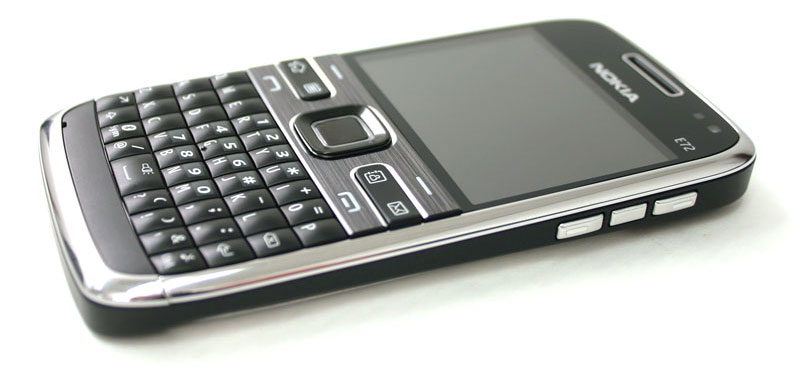
The right-hand side has separate volume up and down keys, along with a voice key for access to applications and contacts without typing (more on that later). The other side has a sealed-up microUSB port, and one of the most deeply recessed and therefore hard-to-use microSD slots we’ve ever found (unless you have long nails, you’ll need a key or pen to pop cards in and out). Up top, you’ll find a centered power button and standard 3.5mm stereo jack for headphones. The bottom offers another tiny charging port for accepting the pin-sized connector from Nokia’s charger, but fortunately, you don’t necessarily need to use it because E72 can also charge from USB, just not as quickly.
Build Quality
Nothing exudes strength quite like steel, and the E72 has been absolutely wrapped in it. From the edges to the rear battery cover, the E72 feels industrial-grade, with a weight and solid feel that even the iPhone cannot match. Like a cobblestone, we found ourselves idly handling it even when we had absolutely no use for it. This is what a device you’ll carry with you every day should feel like.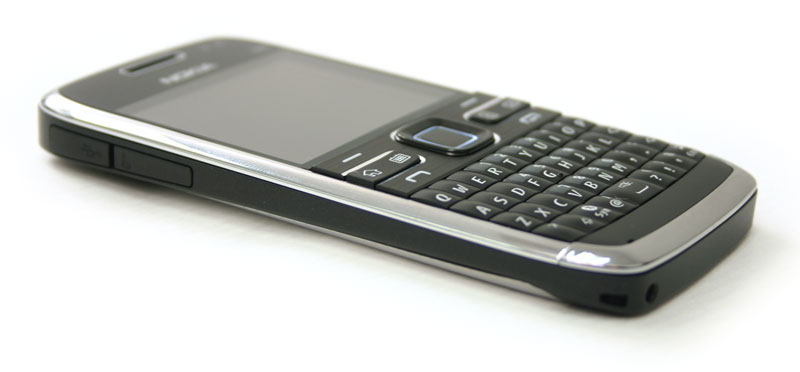
Accessories
Nokia’s comprehensive E72 box includes the usual headset, charger and data cable, along with quite a few unexpected extras. For instance, you’ll find a black microfiber cloth for keeping the phone smudge-free (good luck with that), two extra pairs of ear gels for the headphones, a lanyard, and even a sleek leather case. All in all, it’s one of the more comprehensive cell phone packages we’ve ever had a chance to unwrap.Operating System and General Usage
There’s no getting around the fact that the E72 feels old as soon as soon as the screen flickers to life. The S60 3rd Edition user interface has been kicking around with various “feature packs” as upgrades since 2005, and wears every year of age worse than Cher without makeup. While the snappy 600Mhz processor lets it zip through the icons with reckless abandon, the menus look cheap, pixelated, and just generally outdated.Looking old might be excusable if S60 actually worked very well, but instead it feels like among the most complex and obtuse operating systems out there. Want to change how long it takes to power of the screen when idle? Go to menu, control panel, settings, general, personalization, display. Six menu levels to reach one very basic setting. There’s really just no excuse for a phone to work this way in 2010.

The jumble of Nokia buttons between screen and keyboard can also get confusing. You have hard call and end-call keys on the bottom row, home, calendar, contacts and e-mail shortcuts above, then soft right and left selection keys above that correspond to on-screen prompts. This must have been what Steve Jobs was fed up with when he designed the iPhone. Throw in the Navi Key button in the middle, and you’re looking at an awfully intimidating interface until you get it all nailed down. In its defense, those four shortcut buttons can be reprogrammed to open anything with both a short and long touch, which makes access to commonly used features lightning fast if you care to program and memorize them all.
And about that Navi Key: the optical trackpad doesn’t work nearly as well as we had hoped. Because the edges of the directional pad form a shallow box around it, you can only make very short gestures on it before the ridges around the edges interrupt your swipe. Even with sensitivity cranked to max, we found it hard to navigate more than one tile in any direction on the application menu, without grossly exaggerated (and imprecise) swipes. This basically negated its entire purpose, and after using the directional buttons long enough, we opted to simply turn Navi Key off.
The voice command button on the side promises to end these navigation woes by simply saying what you need to access, like “contacts.” Unfortunately, it’s not quite that simple. Nearly all of the commands we tried were met with “no results found,” leaving us to mainly give up on this lame feature.
Browser
Although might expect such an antiquated operating system to drag along on Web browsing, the Nokia browser actually showed considerable pep. It loaded the Yahoo! Mobile in eight seconds where the iPhone 3G took 16, and DigitalTrends.com in 33 seconds where the iPhone 3G took a minute and seven seconds (both using the same AT&T 3G SIM). That said, the using a mini arrow and directional pad to navigate feels incredibly clumsy, and the browser doesn’t render pages anywhere near as nicely as an iPhone, Palm Pre or Android device does.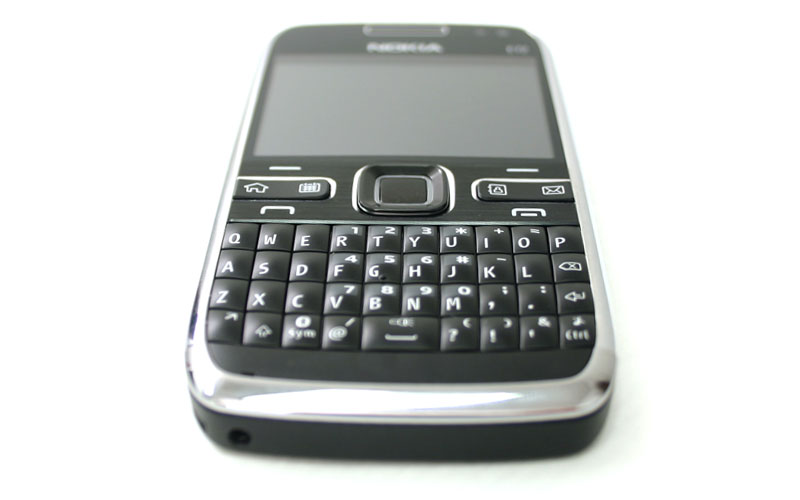
Keyboard
The keyboard on the E72 rivals even the best out there, like BlackBerry’s Bold 9700. Each key has a pillowy bulge that makes it easier to peck, gives a nice snappy return, and generally feels very solid. We found ourselves typing at full speed in no time, and have few doubt that this sturdy keyboard will hold up well to wear and tear.Call Quality
Inbound and outbound sound quality were both outstanding on the Nokia. We gave it the ultimate test: our hard-of-hearing grandmother on her birthday. Without any prompting, she commented on how clear we came across, and other callers reported “landline-like” quality. As a business phone, both factors highly recommend the E72.Battery Life
Nokia reports battery life of 12.5 hours talk time and 20.5 days on standby. While we weren’t able to scientifically validate these claims, our anecdotal observations about battery life during testing line up quite well with these expectations. This thing runs lean on the juice, and we love it.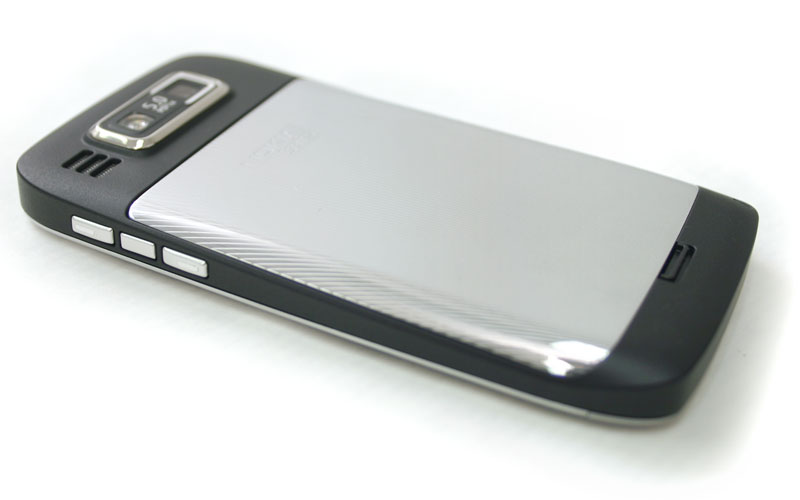
Camera
Say what you will about the bulge that goes with Nokia’s 5-megapixel shooter, but it produces nice pictures… when it focuses properly. We found that most snaps from camera had outstanding clarity and improved color accuracy from the E71, but the autofocus function seemed quite flaky, especially when dealing with close-up subjects. We wish Nokia would release a firmware update to fix the somewhat hit or miss quality to the camera, which would make it a real winner.Conclusion
Why, oh why, can’t Nokia get over S60? The E72 is like a Porsche 911 Turbo with the interior of a 1995 Chevy Lumina. Even though everything “works,” we just have a hard time getting over the crummy cloth seats, hard plastic shifter and manual windows while we’re driving it. If you can look past the many shortcomings of S60, the E72 makes a perfectly usable and downright attractive phone, but Nokia needs to do some serious thinking on its software before going head to head with the likes of Apple, Google and Palm.Highs:
- Extremely attractive design
- BMW build quality
- Rock-solid voice quality and reception
- Fast-loading browser
- Above-average camera
- Responsive navigation
Lows:
- Antiquated S60 interface
- Optical trackpad not useful
- Awkward camera bulge
- Clumsy browser
- Hard-to-use microSD slot
07:35
The Future of Smartphones: 2010-2015 and Beyond

We take a peek into the future to see what the smartphone of tomorrow looks like.
In five years, the concept of a smartphone will change dramatically. How do we know this? Just look at the last half-decade. Since 2005, the Apple iPhone emerged as a cannibalizing platform, made for loading innovative apps, designed with finger-flicking ease-of-use in mind. The rumored Google Phone not only came out in the form of a new operating system, but the actual Nexus One as well. Accelerometers, touchscreens, GPS-based location awareness – these have also all appeared in full force in the last few years and changed the market entirely.
 PC Replacements

The primary change will occur over the next few years as smartphones start behaving more and more like laptops. In June, DoCoMo started offering the Toshiba T-01A in Japan, a super-fast phone that uses an advanced Qualcomm chip. With these fast processors, smartphones will finally run full-blown apps such as Adobe Photoshop – and not just with the limited features offered in the current Photoshop app. There are already signs of other forthcoming power apps on the horizon as well, including tools that can handle photographic effects and process large, high-res images and videos.
Nokia recently launched the N900, which it calls a mobile computer. It runs a Linux operating system and can multitask like a MacBook. In 2015, these powerful laptop replacements will provide true multitasking where you can run Spotify to stream audio, chat over an IM client, process EXIF data for a massive photo collection, and even play World of Warcraft all at the same time. These uber-phones will have similar-size displays and use touch input, but the background processing will be much more advanced and allow full PC-like capabilities.
 Connected Devices

The dream of fully connected, location-aware devices will finally come to fruition. This is more than just a simple Bluetooth dump between business phones, but a full data exchange – say, sending all your favorite apps over Wi-Fi to another smartphone, as well as every movie you have ever download, and all of your music.
“Your phone is likely to be situationally and contextually aware, and present information to you accordingly,” says John Jackson, a vice president of research at CCS Insight. “The phone — and the cloud-based server side intelligence behind it — will know you, your location, your social networks, and your preferences in food, media, and communication. It will predict your next moves. The multi-trillion dollar question is who enables it and controls the sources and uses of information.”
Location awareness will further lead to several other innovations. Phones in 2015 will know when you are near a McDonald’s or Starbucks and offer to pay your bill. Augmented reality – an emerging trend in 2009 – will become a social-awareness tool in the next five years as users link their phones. For example, connected devices could form into an ad hoc broadcast terminal at sporting events where you can view a video feed from a guy in the second row or up in the nose-bleed seats.According to John Shen, the Lab Director at Nokia Research Center, the smartphone of 2015 will go even further: You will be able to link phones together to form a cluster where a group of phones provides PC-like processing capability.
 Gaming Expands Even Further
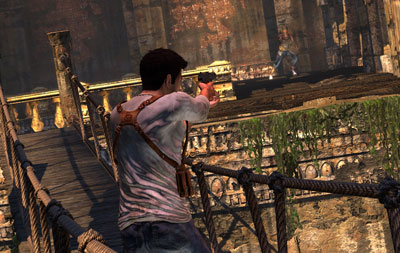
Gaming exploded in 2009 – especially with fantastic shooters such as Alive-4ever on the iPhone, with gameplay and graphics that look like something you’d see on Xbox 360 (granted, as a casual game). Yet, these games also point to a trend where mobile gaming gets much more graphical (like the jump from PS2 to PS3) and gamers will be able to connect with each other for multiplayer shootouts, albeit with not just one or two players, but rather a roomful of 32 gamers all at once.
Moreover, with faster processors and faster carrier service (not to mention faster Wi-Fi), gamers will be able to connect for an experience that is more like the recently released Uncharted 2: Among Thieves where a multiplayer match involves high-resolution graphics, co-operative play with two players on screen at the same time, incredibly fluid gameplay mechanics, and much more realistic console-like sound. At the heart of this new technology: Faster networks and ubiquitous connections for anytime gaming with anyone.“The chips running the device will be highly efficient,” says Jackson. “Like today, your phone will have sufficient memory to store oodles of information, but it will also be connected to the Internet in an ambient way through whatever network makes the most sense (WiFi, cellular… even peer-to-peer possibly).”
 Social Networking and Connections


The Palm Pre and Motorola Droid showed how to aggregate social networking – you can add accounts and view contact info and e-mails in one thread. This multi-service aggregation is just the first step in the smartphone’s coming evolution, however. In 2015, there will be no need to use Facebook on a computer anymore, because your connections will occur in real-time when you meet people in person, swapping contact info, photos, and even personal details (like who you are dating or what you plan to do later that night) in an instant.
This kind of socially-aware service will work like the Poken (www.poken.com) in that it won’t require a lot of user interaction – just enter into an area where someone is actively sharing their Facebook profile or Twitter status and the phones (using a newly emerged networking standard) will swap data even between devices from different manufacturers and on different carriers.Consumer analyst Michael Gartenberg says this social integration will spawn entirely new services and features on smartphones in 2015. For example, once everyone is easily connected through a smartphone portal, you can walk into a room and search for people who like soccer or Peter Jackson films. New marketing paradigms will emerge as well as companies sell their wares to a target audience. This Minority Report-style marketing will explode, offering services and deals to customers as they walk into Starbucks based on a specific purchase history.
And what is the ultimate conclusion? Once these faster, more location-aware, service oriented phones emerge, the PC will quickly become secondary. As such, the smartphone of 2015 and beyond won’t just be an essential traveling companion – it may be your one-stop connection to the computing world at large.